

Met Museum Explorer
Interface UIpar mikechao
Explorez les 500 000+ œuvres d'art du Metropolitan Museum of Art avec une application MCP interactive rendue directement dans votre client d'IA.
Captures d'écran
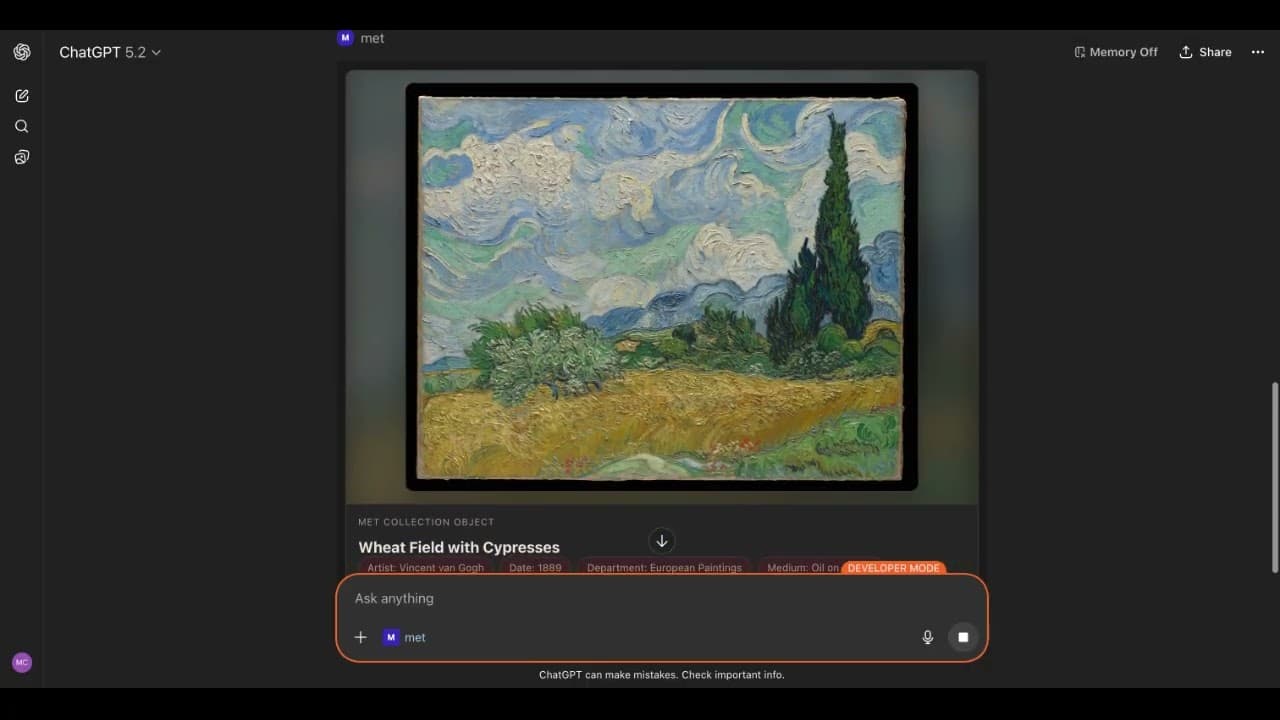
Ce qu'il fait
Met Museum Explorer connecte votre client d'IA à l'ensemble de la collection en accès libre du Metropolitan Museum of Art. Posez des questions sur Van Gogh, filtrez par département ou naviguez par mot-clé — puis lancez l'application interactive Met Explorer pour rechercher et inspecter visuellement les œuvres sans quitter votre conversation.
Fonctionnalités clés
- Application interactive Met Explorer — un navigateur plein écran pour la collection du Met, rendu comme une application MCP directement dans Claude Desktop
- Récupération d'images d'œuvres — récupère des images JPEG encodées en base64 des œuvres en accès libre directement dans les résultats des outils
- Filtrage par département — parcourez les 19 départements, dont les peintures européennes, l'art asiatique et l'art grec et romain
- Recherche paginée — recherche par mot-clé, titre ou département avec un support complet de la pagination
- Transport HTTP — s'exécute comme un serveur local ou hébergé ; une instance hébergée est disponible sur Fronteir AI
Installation
Claude Desktop (recommandé — via npx) :
Ajoutez à claude_desktop_config.json :
{
  "mcpServers": {
    "met-museum": {
      "command": "npx",
      "args": ["-y", "metmuseum-mcp"]
    }
  }
}
Claude Desktop (via bundle MCPB) :
Téléchargez le fichier .mcpb depuis les Releases et faites-le glisser dans Claude Desktop → File → Settings → Extensions.
ChatGPT :
Exécutez npx -y metmuseum-mcp --http localement, exposez-le avec ngrok, puis ajoutez-le comme Connecteur dans les paramètres de ChatGPT.
LibreChat :
mcpServers:
  metmuseum:
    command: npx
    args: [-y, metmuseum-mcp]
Hôtes supportés
Claude Desktop, ChatGPT (via transport HTTP), LibreChat
Installation rapide
npx -y metmuseum-mcpInformations
- Tarification
- free
- Publié
- 4/3/2026
- Mis à jour
- 6 months ago
- étoiles
- 24
Catégories
Choisissez votre client IA et suivez les étapes ci-dessous.
ChatGPT
Run npx -y metmuseum-mcp --http, expose with ngrok, then add as a Connector in ChatGPT settings using the /mcp endpoint.Claude Desktop
Add to claude_desktop_config.json: {"mcpServers":{"met-museum":{"command":"npx","args":["-y","metmuseum-mcp"]}}}Apps similaires

Phish.in
MCP AppBrowse and stream live Phish audience recordings through an AI-powered MCP interface — search setlists, find shows by date or song, and explore the full archive

ChessAgine MCP
MCP AppChess engine intelligence for AI agents — renders boards and PGN games, runs Stockfish analysis, and queries Lichess and neural engines like Maia2 and Leela.

Rijksmuseum MCP+
MCP AppExplore the Rijksmuseum's art collection through natural conversation — with deep-zoom image viewing, semantic search, and provenance analysis.

Clover IIIF Viewer
MCP AppEmbed an interactive IIIF viewer in MCP — browse digital collections, manuscripts, and high-res imagery inside your AI client.

DICOM Viewer MCP
MCP AppView DICOM medical image series directly inside Claude Desktop — slice navigation, pan/zoom, and metadata display without leaving your AI interface.

Nyaomaru 3D MCP UI
MCP AppSelf-hosted MCP server that renders an interactive 3D scene from Nyaomaru 3D directly inside MCP-enabled AI clients via a ui:// resource.

Flappy Bird MCP
MCP AppPlay the classic Flappy Bird game directly inside your AI chat client.

Agentile Framework
MCP ServerA sophisticated system for deterministic music generation, state-space systems, and agentic DJ control.