

DICOM Viewer MCP
Supports UIby thalesmms
View DICOM medical image series directly inside Claude Desktop — slice navigation, pan/zoom, and metadata display without leaving your AI interface.
Screenshots
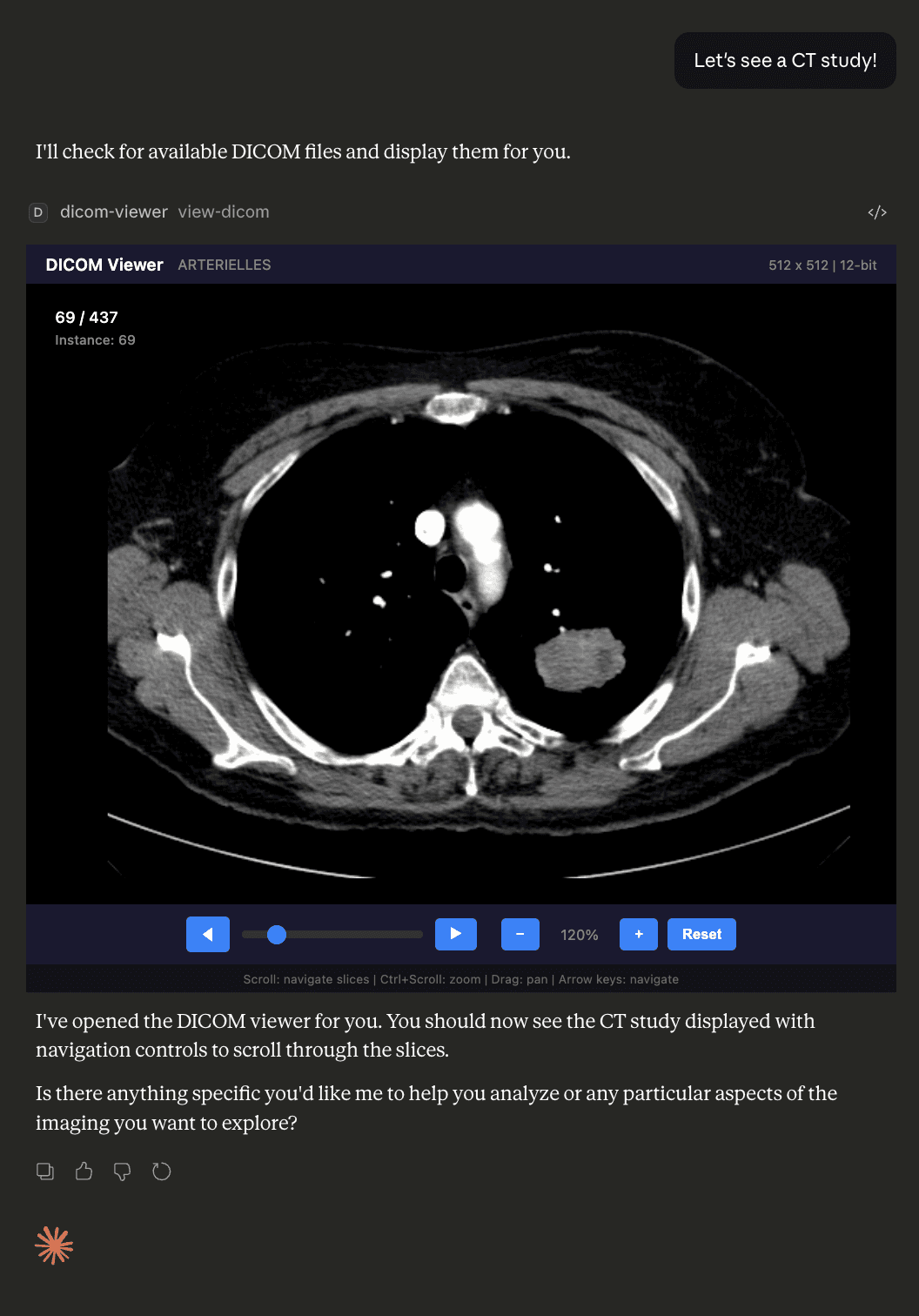
What it does
DICOM Viewer MCP is a prototype MCP App that lets you load and navigate medical imaging studies (.dcm files) directly within Claude Desktop. It processes DICOM files server-side using dicom-parser and sharp, converts pixel data to PNG with proper window/level handling, and serves the result as an interactive HTML resource — bypassing Content Security Policy restrictions entirely.
Key features
- In-interface DICOM rendering — no external viewer needed; images appear inside Claude Desktop
- Series navigation — scroll wheel, slider, previous/next buttons, and Home/End keyboard shortcuts to move through slices
- Pan and zoom — Ctrl+scroll to zoom, click-and-drag to pan, reset button to restore default view
- Server-side processing — handles window/level, rescale slope/intercept, MONOCHROME1/2, 8-bit and 16-bit pixel data
- Automatic slice sorting — orders by Instance Number or Slice Location
Installation
Clone the repository and build locally, then register it in your Claude Desktop config.
git clone https://github.com/ThalesMMS/dicom-viewer-mcp-prototype.git
cd dicom-viewer-mcp-prototype
npm install
npm run build
Claude Desktop: Add to ~/Library/Application Support/Claude/claude_desktop_config.json (macOS):
{
  "mcpServers": {
    "dicom-viewer": {
      "command": "node",
      "args": ["/absolute/path/to/dicom-viewer-mcp-prototype/dist/index.js", "--stdio"]
    }
  }
}
Place .dcm files in the ./dicom/ folder, restart Claude Desktop, then ask Claude to "show me a DICOM study".
Supported hosts
- Claude Desktop (stdio transport)
Note: Currently supports uncompressed DICOM only (Explicit/Implicit VR Little Endian). JPEG/JPEG2000 compressed files are not yet supported.
Quick install
git clone https://github.com/ThalesMMS/dicom-viewer-mcp-prototype.git && cd dicom-viewer-mcp-prototype && npm install && npm run buildInformation
- Pricing
- free
- Published
- 4/3/2026
- Updated
- 6 months ago
- stars
- 2
Categories
Choose your AI client and follow the steps below.
Claude Desktop
{
  "mcpServers": {
    "dicom-viewer": {
      "command": "node",
      "args": ["/absolute/path/to/dicom-viewer-mcp-prototype/dist/index.js", "--stdio"]
    }
  }
}VS Code Copilot
Not confirmed in README.Related Apps

Phish.in
MCP AppBrowse and stream live Phish audience recordings through an AI-powered MCP interface — search setlists, find shows by date or song, and explore the full archive

Met Museum Explorer
MCP AppSearch and explore The Metropolitan Museum of Art's 500,000+ artworks with an interactive MCP App that renders directly in your AI client.

ChessAgine MCP
MCP AppChess engine intelligence for AI agents — renders boards and PGN games, runs Stockfish analysis, and queries Lichess and neural engines like Maia2 and Leela.

Rijksmuseum MCP+
MCP AppExplore the Rijksmuseum's art collection through natural conversation — with deep-zoom image viewing, semantic search, and provenance analysis.

Clover IIIF Viewer
MCP AppEmbed an interactive IIIF viewer in MCP — browse digital collections, manuscripts, and high-res imagery inside your AI client.

Nyaomaru 3D MCP UI
MCP AppSelf-hosted MCP server that renders an interactive 3D scene from Nyaomaru 3D directly inside MCP-enabled AI clients via a ui:// resource.

Flappy Bird MCP
MCP AppPlay the classic Flappy Bird game directly inside your AI chat client.

Agentile Framework
MCP ServerA sophisticated system for deterministic music generation, state-space systems, and agentic DJ control.