

Nashville Charts
Interface UIpar bryankthompson
Grilles d'accords interactives basées sur le Nashville Number System dans Claude Desktop — parcourez, transposez dans n'importe quelle tonalité, analysez la compatibilité des medleys et gérez vos setlists.
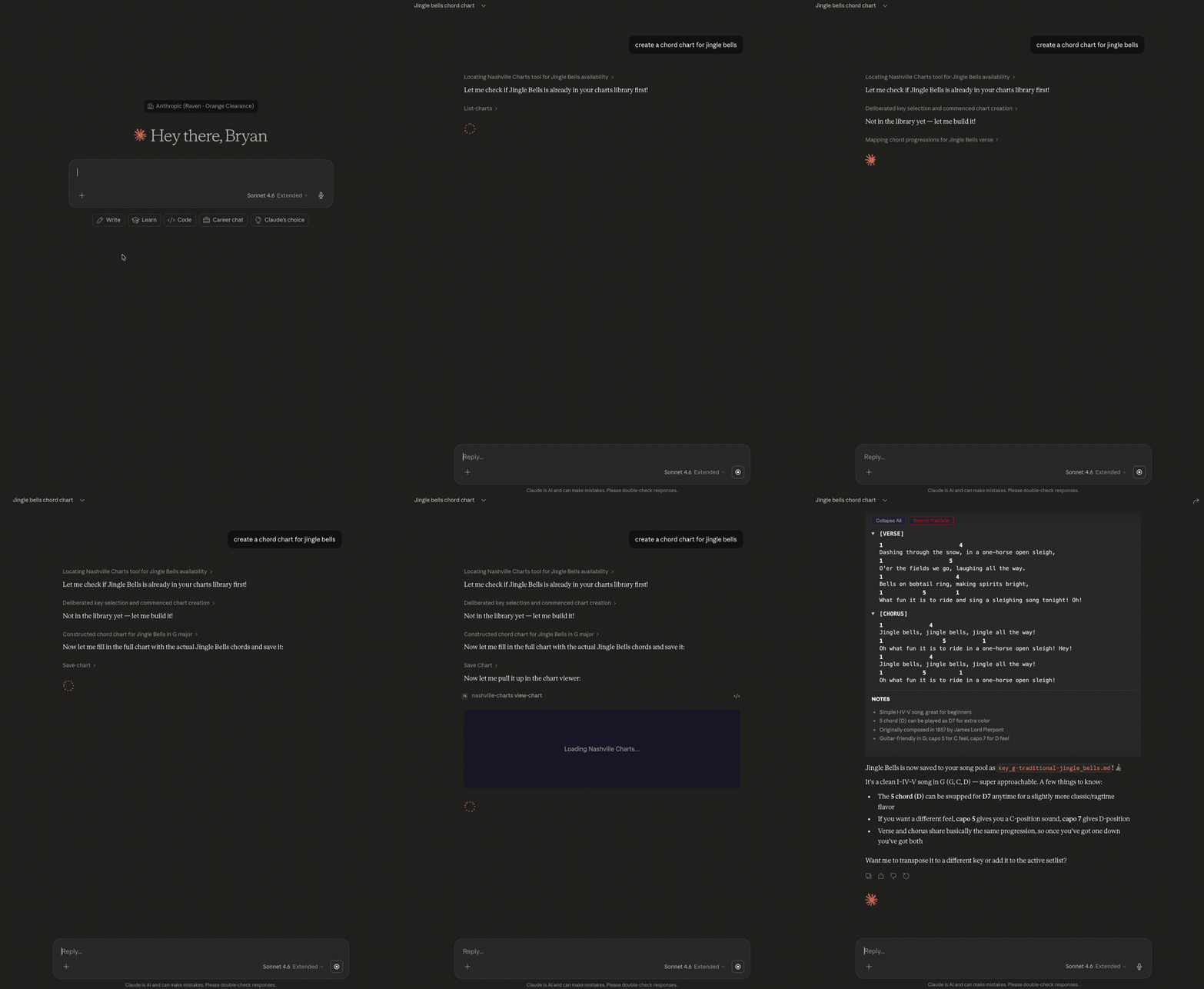
Captures d'écran
Ce qu'il fait
Nashville Charts génère des grilles d'accords entièrement interactives utilisant le Nashville Number System (NNS) — la notation utilisée par les musiciens de session professionnels où les accords sont écrits comme des degrés de gamme (1, 4, 5, 6-) plutôt que par des noms de lettres. Parce que les chiffres sont indépendants de la tonalité, chaque grille est instantanément transposable. L'application réside dans Claude Desktop sous forme de SPA React et offre aux musiciens un flux de travail complet pour les grilles : créer, parcourir, transposer, planifier des setlists et analyser les appariements de medleys — tout cela en langage naturel.
Fonctionnalités clés
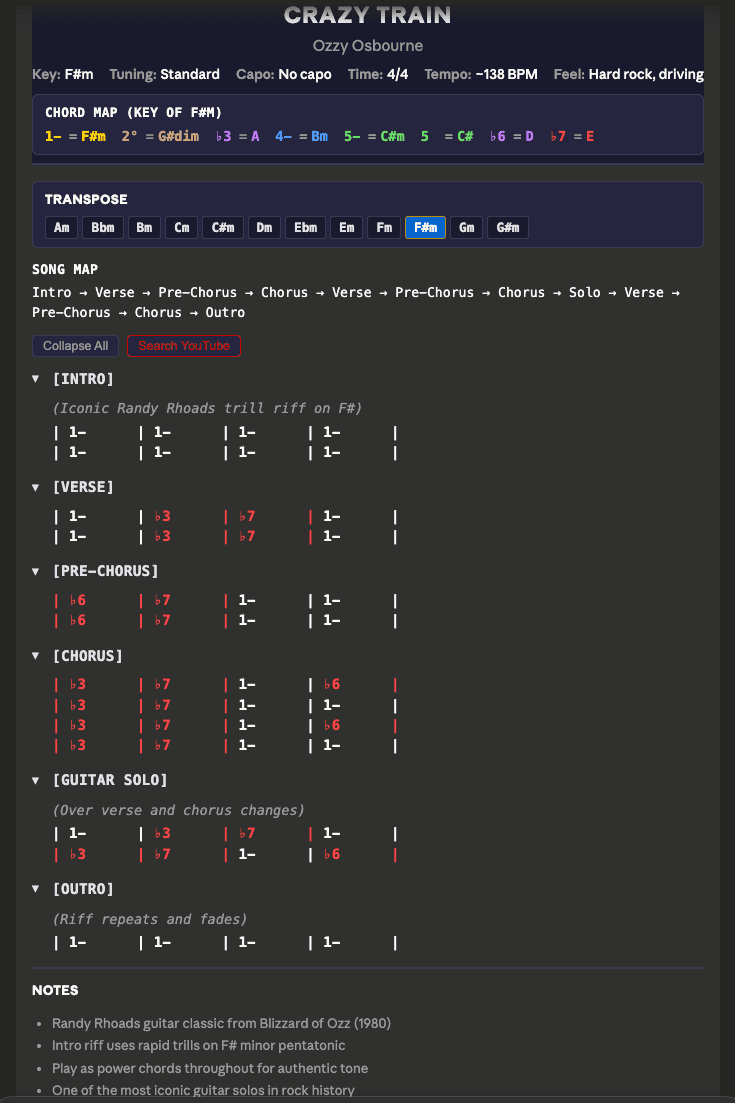
- Visionneuse de grilles avec code couleur — Degrés de gamme rendus avec des couleurs distinctes (1=or, 4=bleu, 5=vert, 6-=violet, non-diatonique=rouge) pour un balayage visuel rapide. Sections repliables avec annotations de performance et alignement chords-over-lyric en police monospace.
- Transposition en un clic — Cliquez sur l'un des 12 boutons de tonalité pour recalculer instantanément toute la carte d'accords. Inclut des recommandations de capo avec des formes d'accords ouverts (ex: "Capo case 2, jouer formes en G").
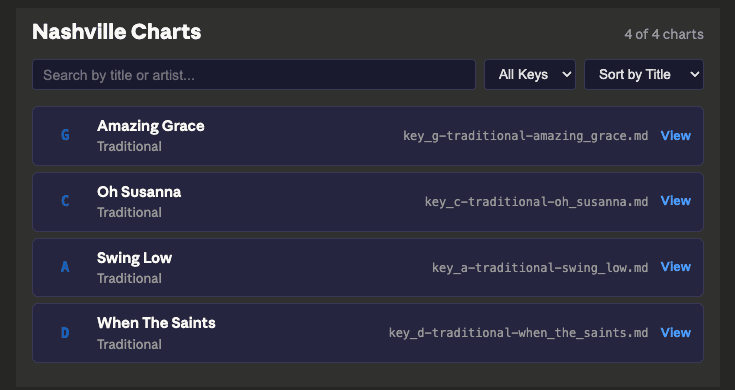
- Navigateur de grilles — Recherche possible, filtrage par tonalité, tri par titre/artiste/tonalité. Livré avec 4 grilles d'exemple du domaine public.
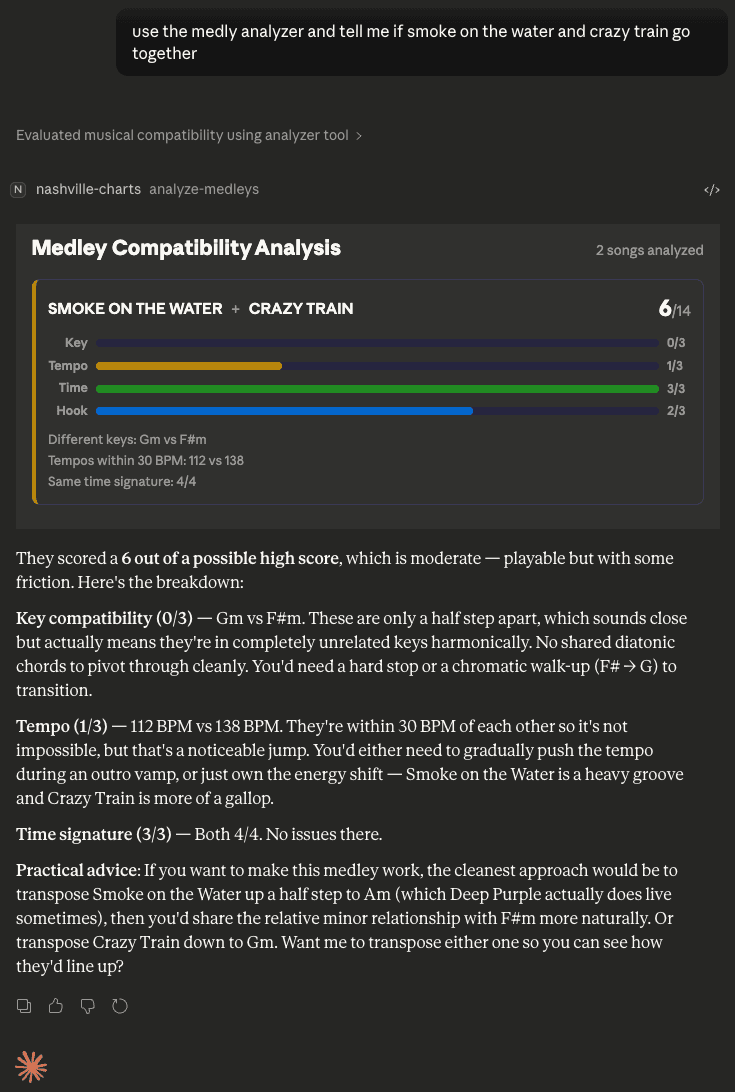
- Analyseur de Medley — Évalue les paires de chansons selon la compatibilité des tonalités, la proximité du tempo, la signature rythmique et la similarité des hooks. Barres de score visuelles sur 14 avec les conseils de transition de Claude.
- Gestionnaire de Set List — Organisateur à deux colonnes pour déplacer les chansons entre le set actif et le pool.
- Création de grilles — Génère de nouvelles grilles NNS via le langage naturel, avec carte d'accords auto-calculée, suggestion de capo et structure de sections.
Installation
Claude Desktop
Ajoutez à votre claude_desktop_config.json :
- macOS :
~/Library/Application Support/Claude/claude_desktop_config.json - Windows :
%APPDATA%\Claude\claude_desktop_config.json
{
  "mcpServers": {
    "nashville-charts": {
      "command": "npx",
      "args": ["-y", "nashville-charts-app", "--stdio"],
      "env": {
        "CHARTS_ROOT": "~/my-charts"
      }
    }
  }
}
Redémarrez Claude Desktop. Essayez : "Montre-moi Amazing Grace" ou "Parcours mes grilles".
Hôtes supportés
Claude Desktop (confirmé dans le README). Supporte les transports stdio et StreamableHTTP.
Installation rapide
npx -y nashville-charts-app --stdioInformations
- Tarification
- free
- Publié
- 4/5/2026
- Mis à jour
- 6 months ago
- étoiles
- 0
Catégories
Choisissez votre client IA et suivez les étapes ci-dessous.
Claude Desktop
Add to claude_desktop_config.json: {"mcpServers":{"nashville-charts":{"command":"npx","args":["-y","nashville-charts-app","--stdio"],"env":{"CHARTS_ROOT":"~/my-charts"}}}}Apps similaires

Phish.in
MCP AppBrowse and stream live Phish audience recordings through an AI-powered MCP interface — search setlists, find shows by date or song, and explore the full archive

ChessAgine MCP
MCP AppChess engine intelligence for AI agents — renders boards and PGN games, runs Stockfish analysis, and queries Lichess and neural engines like Maia2 and Leela.

Met Museum Explorer
MCP AppSearch and explore The Metropolitan Museum of Art's 500,000+ artworks with an interactive MCP App that renders directly in your AI client.

Rijksmuseum MCP+
MCP AppExplore the Rijksmuseum's art collection through natural conversation — with deep-zoom image viewing, semantic search, and provenance analysis.

Clover IIIF Viewer
MCP AppEmbed an interactive IIIF viewer in MCP — browse digital collections, manuscripts, and high-res imagery inside your AI client.

DICOM Viewer MCP
MCP AppView DICOM medical image series directly inside Claude Desktop — slice navigation, pan/zoom, and metadata display without leaving your AI interface.

Nyaomaru 3D MCP UI
MCP AppSelf-hosted MCP server that renders an interactive 3D scene from Nyaomaru 3D directly inside MCP-enabled AI clients via a ui:// resource.

Flappy Bird MCP
MCP AppPlay the classic Flappy Bird game directly inside your AI chat client.